Discover your country with Scratch
| Aim | The purpose of the series of classes described here regards the process of learning geography by means of creativity and use of IT instruments (mainly Scratch programming). The complexity level of the programs template runs from pretty simple to medium. It involves the use of Scratch to develop animated stories (similar to cartoon movies). The pupils learn and develop multiple skills by this kind of activity. |
|---|---|
| Duration | 2 hours |
| Technology | Scratch programming environment, Internet/web access |
| Materials | Scratch examples, geography textbooks, Wikipedia access |
| Student/teacher Ratio | 10-15 students / teacher |
| Student/resource Ratio | 2 students per computer |
| Age of students | 9–11 years |
Special information
In this learning activity, by creating and implementing an animated geographical map, students combine learning geography with learning Scratch programming; creativity is also enhanced.
In this activity, the students are actually invited to watch their colleagues’ results, and to be inspired in developing their own.
Step by step overview
Through this activity, students become familiar with the process of writing geographical stories / descriptions / tags in their national language or English, and then they learn how to introduce and build the characters / sprites onto the map of the described country. Making the characters interact stimulates the taste for dialogue and improves their conversational skills. Furthermore, the students learn about the typical geographic traits of a particular place / location / city and how to structure and synthesize them.
Since the stories can also be written in English, this builds up pupils’ vocabulary and also the need for learning the grammar and the specific syntax of the language (which is not always similar to the children native language).
The creativity of the students is reflected also in the graphical design of backgrounds, canvas, scenes build-up, characters design and clothes. The architecture of the scenes reflects the imagination of the children, requiring them to aggregate various elements (both natural: trees, clouds, etc. or man-made/artificial: roads, castles, etc.).
Hopefully these kind of activities may also trigger the appetite for reading (more) within these young students.
A detailed example follows (the .sb2 file for the animated story presented below is available both on the Scratch platform and in the bibliography below). The country chosen for this combined lesson of geography, English language and Scratch programming is Romania.
Make sure that Scratch software is installed, or that the scratch URL is accessible. Then, create a new Scratch project.
I. ADDING THE SPRITES ON THE STAGE
Find a map of Romania (or any country of study), and import the image as sprite. You could draw the map instead.
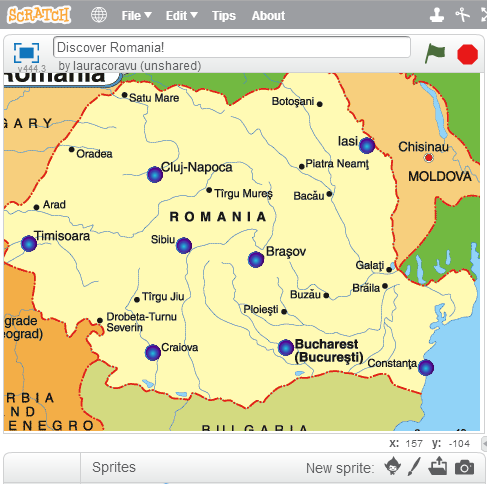
- Establish the coordinates of the map. Look for the x and y values listed on the low-right corner while you are moving the mouse over the map.
- Mark on the map several important cities or towns. You can use button sprites for this. You can change the size or color of the button imported from the library.
- Rename the button according to the name of the town. Establish the coordinates for each button on the map.
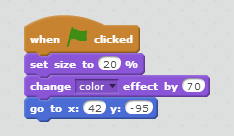
II. ADDING EVENTS. WRITING THE ACTIONS FOR THE BUTTONS
- When a user wants to click on a button from the map, some detailed information about that city should be seen. We don’t want the country's map to be hidden, so we will change the level of visibility using ghost effect.
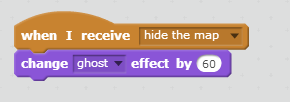
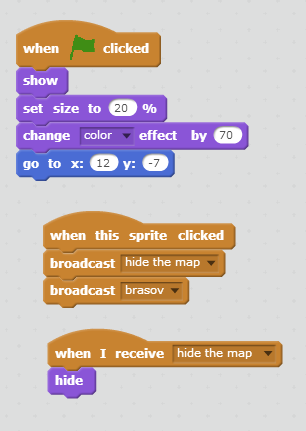
- Below, there is a picture with the treated events by now. First, when clicking a button on the map, we "hide" the map, applying a ghost effect and then "show" the appropriate information regarding that town. If you want, you can post a picture instead of a text, or add music. We could also add some touristic objectives that should be seen for that place as well as a large "Welcome to …".
Tips to make the workshop go smoothly
- Have Internet connection available at all times, and allow pupils to surf Wikipedia or other geographical / cultural sites for information concerning the points of interest marked on the map.
- Discuss with pupils about the things they know already about traditions, historical events, cultural landmarks, etc. and then encourage them to locate these on the map.
Encourage pupils to upload their projects on the Scratch platform and challenge them to discuss and rank the results.
Extensions and challenges
Indicate on the map of your country the major historical places and their timeline.
- Add an animated character to the map that will assist the viewer in visiting the points of interest.
- Choose your favourite country and do the same activity.
- Extend the activity to the European map.
Sources of additional information
- Scratch programming platform, available at http://scratch.mit.edu