Making a clock in Scratch
| Aim | To create a chronometer with Scratch which functions properly and has a counter for seconds and minutes. The idea is to learn angles and geometry concepts in an intuitive way. The activity suits very well for subjects like Maths, Art or Technology. |
|---|---|
| Duration | 2 sessions of 1 hour |
| Technology | Scratch |
| Materials | Computer, projector and Scratch are required |
| Student/teacher Ratio | 10-12 students/teacher / 2 students/computer |
| Age of students | 10-12 years old |
Special information
Teacher needs a medium understanding of Scratch. Students need a medium/high knowledge of Scratch, geometry aspects (angles) and opening, saving and dragging files from the computer.
Step by step overview
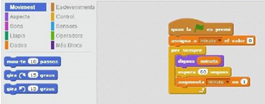
Here we see the computer programming required to center the white clock face.
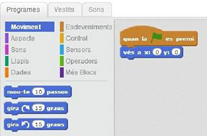
This is the one we use to align the seconds display with the white clock face and it shows 12, at the same time it starts to move forward 1 second each second. This is where the children should work out the angle that the seconds hand turns every second. The teacher should guide students toward discovery and let them find the solution themselves.
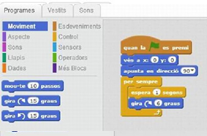
Next is the one we use to center the minutes display with the white face and it shows 12, at the same time it moves forward 1 minute each 60 seconds. As in the previous step, here the students should discover the angle by themselves.
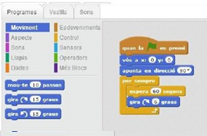
This one is used to show us how the character counts the seconds at the same time it moves forward every second. These last two steps are optional and are used to introduce the concept of a variable. The idea is to create two variables that are counting and showing the seconds and minutes.
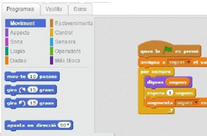
The following one is used to show us how the character counts the minutes at the same time it moves forward every minute.
Tips to make the workshop go smoothly
To start the activity, students need to save a clock face and hands from the internet.
Extensions and challenges
When the children have reached the main goal of the activity they can add a sprite in the middle of the clock face. Now the students’ goal is to make this sprite move every second. This sprite should have different costumes to let it move. About the counter, at first, it appears at the very top of the screen. Children can change it using one or two sprites that talk - what they say are the seconds and the minutes as time passes.
Sources of additional information
1.Some theory for secondary and high school students: https://sites.google.com/site/mymathclassroom/trigonometry/clock-angle-problems/clock-angle-problem-formula
2.Scratch tutorials in English: https://scratch.mit.edu/help/videos/